Building an Agent Without Frameworks
Build a deterministic execution loop in Python from scratch, exploring execution state, termination conditions, failure handling, and the foundations of AI agent control.
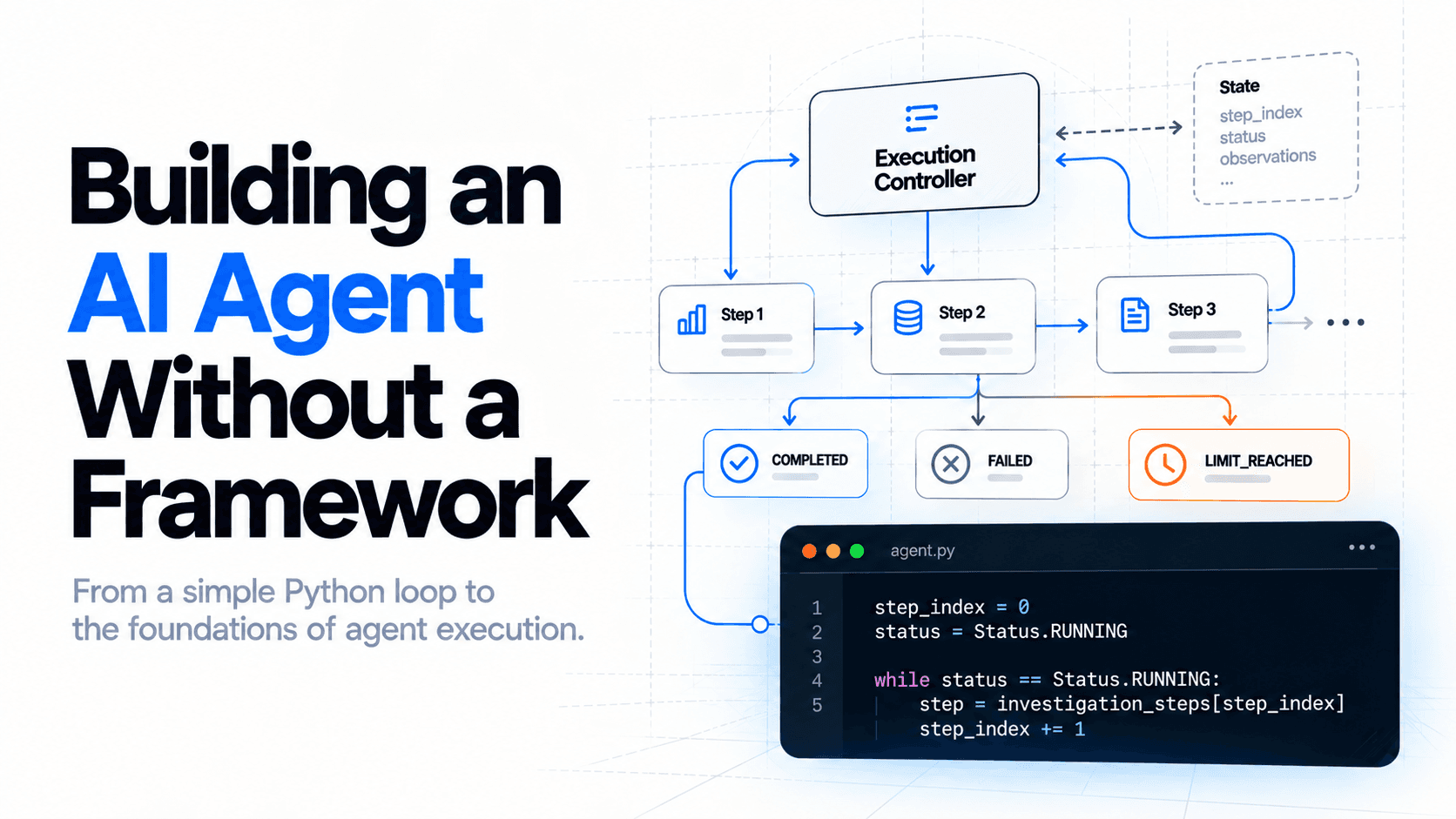
Building an AI Agent Without a Framework
Building an AI agent does not have to begin with a framework or a language model. At its foundation, an agent-like system needs a mechanism to execute steps, maintain state, handle failures, and termine when to stop.
In this first part, we will build a deterministic execution loop from scratch using Python, exploring the fundamental control mechanisms that more sophisticated AI agents build upon.
Building Our First Execution Loop
An AI agent needs more than an LLM to execute a task. It needs a mechanism that controls what happens during execution: which action runs, how its result is recorded, whether another action should follow, and when the process must stop.
These responsibilities are easy to overlook when working with agent frameworks because many of the execution details are already implemented for us.
In this article, we’ll build that foundation ourselves, using Python and no agent orchestration frameworks.
We’ll start with a deterministic execution loop, progressively introduce execution state and termination conditions, and examine how the application handles failures and execution limits. We won't integrate an LLM yet.
That comes in the next chapter.
Our Scenario: Investigating API Latency
An API is experiencing increased response times. To investigate, an engineer might check latency metrics, review recent deployments, and examine the available evidence.
We will use this scenario to build our first execution loop.
- Check API latency metrics.
- Check recent deployments.
- Evaluate the collected findings.
For now, we will simulate the observations. This lets us focus on execution before introducing external services, tools, or language models.
investigation_steps = [
   {
       "action": "Check API latency",
       "observation": "P95 latency increased to 850 ms.",
   },
   {
       "action": "Check recent deployments",
       "observation": "A deployment occurred 15 minutes ago."
   },
   {
       "action": "Evaluate findings",
       "observation": "The latency increase correlates with the deployment.",
   },
]
Each investigation step contains an action and an observation.
The action describes what the application should execute. The observation represents the information that step produces.
At this stage, both values are predefined. Our program isn't collecting real metrics or interpreting the evidence. We're simply establishing the data structure that our execution loop will process.
Executing the Steps
Add the following code below:
step_index = 0

while step_index < len(investigation_steps):
   step = investigation_steps[step_index]
   print(f"\n[Step {step_index + 1}] {step['action']}")
   print(f"Observation: {step['observation']}")

   step_index += 1

print("\nInvestigation completed.")
Expected output:
[Step 1] Check API latency
Observation: P95 latency increased to 850 ms.

[Step 2] Check recent deployments
Observation: A deployment occurred 15 minutes ago.

[Step 3] Evaluate findings
Observation: The latency increase correlates with the deployment.

Investigation completed.
We've created a deterministic execution loop.
The program retrieves one step, processes its predefined information, advances to the next step, and stops when no steps remain.
The implementation is intentionally small, but it already exposes the mechanisms we’ll need to examine carefully.
Understanding Execution State
Our first implementation relies on a single variable:
step_index = 0
This variable tells the application which step should execute next; after each iteration, we increment it:
step_index += 1
And the execution continues while:
while step_index < len(investigation_steps)
Together, these operations determine the program's progress. But the index doesn't tell us everything about execution.
For example, suppose the program stops after processing the second step. Did the investigation finish? Did an operation fail? Did we intentionally interrupt execution? The index alone cannot answer these questions.
Separating Progress from Status
We need to distinguish two concepts: execution progress, which step should run next, and execution status: whether the process is running, completed, failed, or stopped by a limit.
These concepts are related, but they represent different information. Consider two executions that both stop with step_index = 2. The first might have completed a two-step investigation successfully. The second might have failed while attempting the third step.
The index is the same, but the outcomes differ. Let's represent execution status explicitly.
from enum import Enum

class Status(str, Enum):
   RUNNING = "running"
   COMPLETED = "completed"
   FAILED = "failed"
   LIMIT_REACHED = "limit_reached"

step_index = 0
status = Status.RUNNING

while status == Status.RUNNING:
   if step_index >= len(investigation_steps):
       status = Status.COMPLETED
       break

   setp = investigation_steps[step_index]

   print(f"\n[Step {step_index + 1} {step['action']}]")
   print(f"Observation: {step['observation']}")

print(f"\nExecution status: {status.value}")
State Transitions
We can describe execution as a sequence of state transitions:
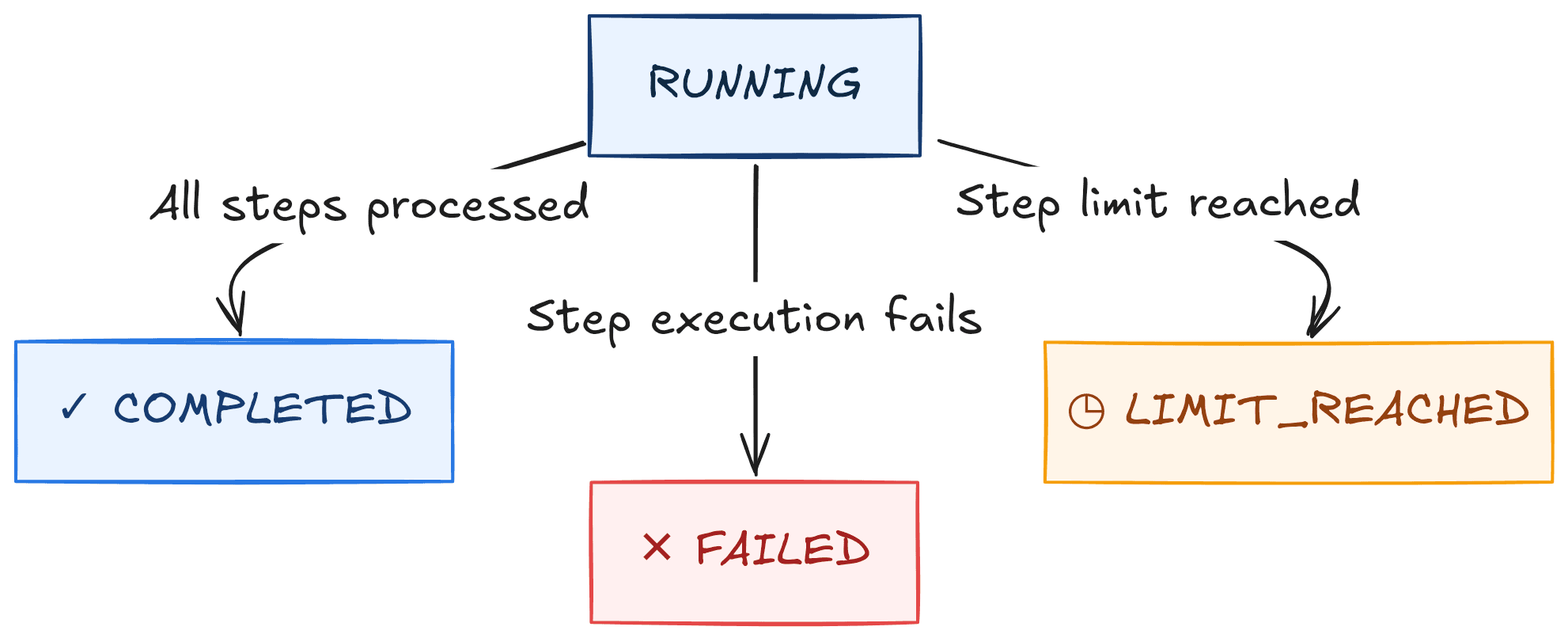
These transitions represent different outcomes.
- COMPLETED means the predefined sequence finished successfully. It doesn't necessarily mean the underlying API incident was resolved.
- FAILED means execution could not continue because an operation raised an error.
- LIMIT_REACHED means the application stopped because its configured execution budget was exhausted.
We've defined the possible outcomes. Next, we’ll give the application a single place to manage them.
Who Controls the Execution?
Our loop currently mixes several responsibilities: retrieving steps, printing observations, advancing the index, and deciding when to stop execution.
For three predefined steps, this is manageable. As execution becomes more complex, however, mixing these responsibilities makes the behavior harder to test and modify.
We can improve the design by separating step execution from execution control.
The step executor performs one operation and returns its observation. The controller determines whether that operation can run, updates the execution state, and decides whether another iteration should occur.
This separation establishes an important boundary: an operation can produce information without controlling the entire process.
Introducing an Execution Controller
We will now organize our implementation into a small Python module. Create this structure:
python/
  src/
    agent.py
    main.py
  tests/
    tests_agent.py
The earlier single-file example was useful for understanding the loop; from this point forward, we’ll move the execution logic into agent.py and use main.py to run it.
from dataclasses import dataclass, field
from enum import Enum
from typing import Callable

class Status(str, Enum):
   RUNNING = "running"
   COMPLETED = "completed"
   FAILED = "failed"
   LIMIT_REACHED = "limit_reached"

@dataclass(frozen=True)
class Step:
   action: str
   observation: str

@dataclass
class ExecutionState:
   status: Status.RUNNING
   step_index: int = 0
   observation: list[str] = field(default_factory=list)
   error: str | None = None

def execute_step(step: Step):
    return step.observation
We've introduced three building blocks.
- Step represents an investigation operation and its simulated result
- ExecutionState stores the current execution status, the next step index, collected observations, and an optional error message.
- execute_step() represents the operation that processes a step
For now, the executor simply returns the predefined observation. Later, this boundary can support real tool execution.
Why Use a Dataclass?
A dataclass groups related values into an explicit structure. Instead of passing independent variables such as status, step_index, and observations throughout the application, we can pass a single ExecutionState object.
We also use field(default_factory=list) so that every new execution receives its own observations list.
This prevents independent executions from unintentionally sharing mutable state. The Step dataclass is frozen because our simulated investigation steps do not need to change during execution.
We now have a state representation and a function that performs one step. The missing component is the controller.
Improving the Execution Loop
A controller needs to answer three questions before each iteration:
- Have all steps been completed?
- Has the execution reached its configured limit?
- If execution is allowed, what happens when the next step succeeds or fails?
We will implement these checks in a single function.
Implementing the Controller
Add the following piece of code to python/src/agent.py:
def run(
           steps: list[Step],
           max_steps: int = 10,
           executor: Callable[[Step], str] = execute_step,

   ) -> ExecutionState:
       if max_steps < 1:
           raise ValueError("max_steps must be at least 1")

       state = ExecutionState()

       while state.status == Status.RUNNING:
           if state.step_index >= len(steps):
               state.status = Status.COMPLETED
               break

           if state.step_index >= max_steps:
               state.status = Status.LIMIT_REACHED
               break

           step = steps[state.step_index]

           try:
               observation = executor(step)
           except Exception as exc:
               state.status = Status.FAILED
               state.error = str(exc)
               break

           state.observation.append(observation)
           state.step_index += 1

       return state
This function is the core of our implementation. Let's examine its behavior.
Checking for Completion
    if state.step_index >= len(steps):
        state.status = Status.COMPLETED
        break
Before executing another operation, the controller checks whether any steps remain. If all steps have already been processed, execution finishes successfully. An empty investigation also completes immediately because nothing needs to run.
Enforcing an Execution Limit
    if state.step_index >= max_steps:
        state.status = Status.LIMIT_REACHED
        break
The controller also enforces a maximum number of successfully executed steps. Without an explicit limit, a future implementation that continuously generates new actions could run longer than intended.
In this version, the number of steps is already finite. The limit therefore demonstrates the control mechanism rather than protecting against an actually unbounded planner.
The check occurs before executing the next step, so the controller never intentionally starts more than max_steps operations. For example, with three investigation steps and max_steps=2, only the first two steps will execute.
Executing a Step
step = steps[state.step_index]
observation = executor(step)
The controller selects the next predefined step and passes it to the executor. Notice that the controller doesn't need to know how the observation is produced. This is a deliberate design choice.
The executor could eventually query a monitoring API, read a log file, or call another service without requiring the controller to implement those operations itself.
Recording the Observation
state.observation.append(observation)
After successful execution, the controller records the returned observation and advances to the next step. The order matters. If the executor raises an exception, neither operation is performed. The index therefore continues to point to the failed step.
Handling Failures
    except Exception as exc:
        state.status = Status.FAILED
        state.error = str(exc)
        break
A failed operation should not be silently treated as successful.
Our controller catches the exception, records the failure, and stops execution. This is a deliberately simple failure policy: fail fast.
Production systems may need retries, timeouts, cancellation, or more specific exception handling. Those mechanisms introduce additional design decisions that we’ll examine in later chapters.
For this experiment, stopping on failure makes the execution behavior explicit and predictable.
The Execution Boundary
Our architecture now has a clear separation:
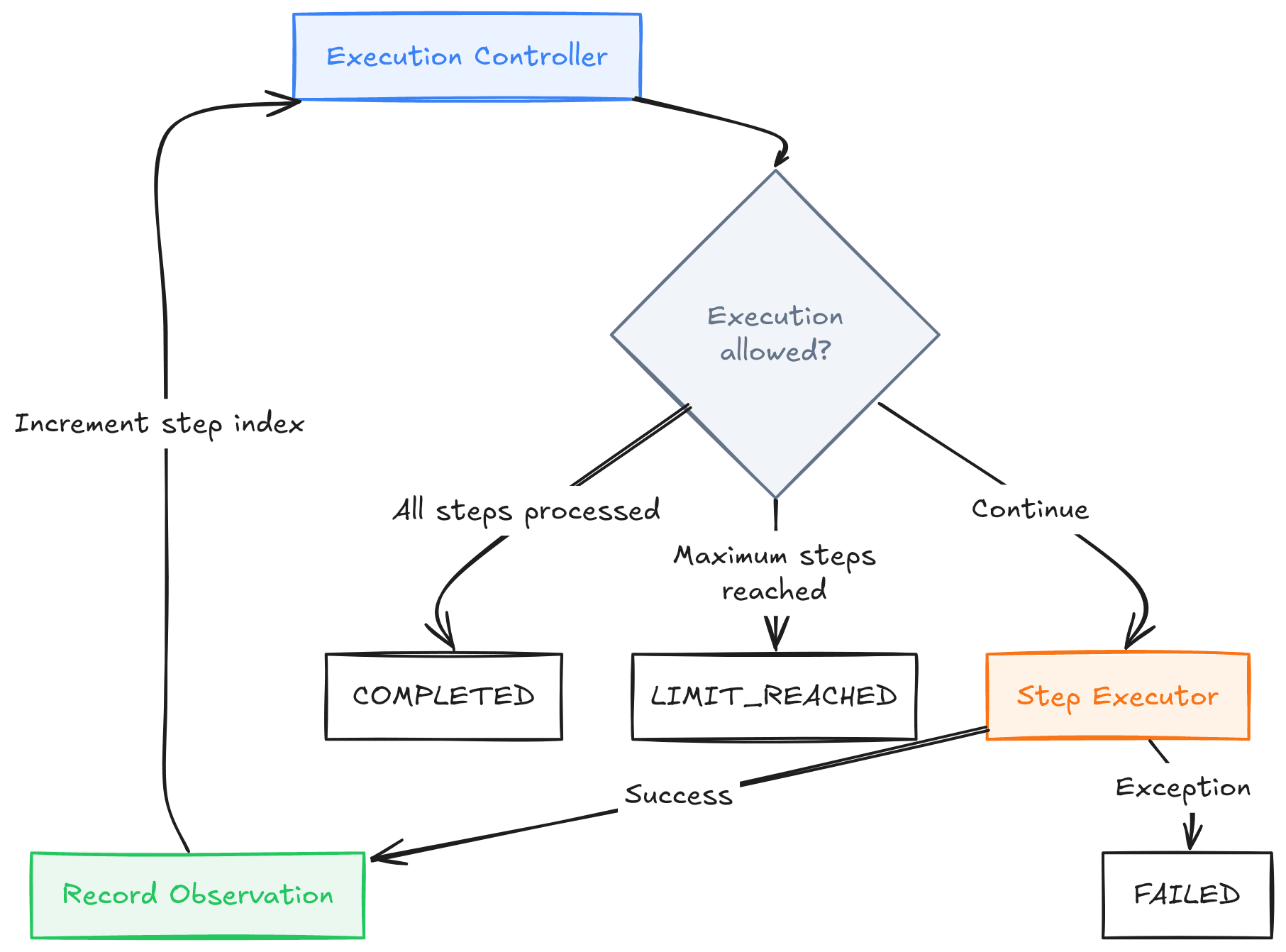
The controller owns execution flow. The executor owns the operation performed during one step.
This distinction will matter most when a language model begins proposing actions. A model may suggest what to do, but the application must still determine what it can execute.
Running and Testing the Execution Loop
We now have enough components to run our investigation through the controller.
Running the Investigation
Add the following code into python/src/main.py:
from agent import Step, run

investigation_steps = [
   Step(
       action="Check API latency",
       observation="P95 latency increased to 850 ms.",
   ),
   Step(
       action="Check recent deployments",
       observation="A deployment occurred 15 minutes ago.",
   ),
   Step(
       action="Evaluate findings",
       observation="The latency increase correlates with the deployment.",
   ),
]

if __name__ == "__main__":
   state = run(investigation_steps)

   for index, (step, observation) in enumerate(zip(investigation_steps, state.observation),
       start=1,
   ):
       print(f"\n[Step {index}] {step.action}")
       print(f"Observation: {observation}")

       print(f"\nExecution stats: {state.status.value}")
       print(f"Steps executed: {state.step_index}")
The controller processed all three steps and returned an ExecutionState, containing the final status and collected observations. But successful execution is only one scenario. We also need to verify what happens when the system cannot complete normally.
Testing Execution Behavior
import sys
import unittest
from pathlib import Path

sys.path.insert(0, str(Path(__file__).resolve().parents[1] / "src"))

from agent import Status, Step, run

class ExecutionLoopTests(unittest.TestCase):
   def setUp(self):
       self.steps = [
           Step(
               action="Check API latency",
               observation="P95 latency increased to 850 ms.",
           ),
           Step(
               action="Check recent deployments",
               observation="A deployment occurred 15 minutes ago.",
           ),
           Step(
               action="Evaluate findings",
               observation="The latency increase correlates with the deployment.",
           ),
       ]

   def test_completes_all_steps(self):
       state = run(self.steps)

       self.assertEqual(state.status, Status.COMPLETED)
       self.assertEqual(state.step_index, 3)
       self.assertEqual(len(state.observation), 3)

   def test_stops_at_execution_limit(self):
       state = run(self.steps, max_steps=2)

       self.assertEqual(state.status, Status.LIMIT_REACHED)
       self.assertEqual(state.step_index, 2)
       self.assertEqual(len(state.observation), 2)

   def test_stops_when_execution_fails(self):

       def failing_executor(step):
           raise RuntimeError("Metrics service unavailable.")

       state = run(self.steps, executor=failing_executor)

       self.assertEqual(state.status, Status.FAILED)
       self.assertEqual(state.step_index, 0)
       self.assertEqual(state.observation, [])
       self.assertEqual(
           state.error,
           "Metrics service unavailable.",
       )

if __name__ == "__main__":
   unittest.main()
Run the tests from the repository root:
python -m unittest discover -s python/tests -vThe expected result is three passing tests. Each test verifies a different execution outcome.
Successful completion: all predefined steps execute, observations are recorded and the final status is COMPLETED.
Execution limit: the inject executor raises an exception. The controller records the error and returns FAILED without advancing the step index.
Why inject the Executor?
Notice that run() accepts an executor parameter:
executor: Callable[[Step], str] = execute_step
This allows tests to replace the normal executor with a controlled implementation. For example, our failure test supplies a function that always raises an exception.
We can therefore test failure handling without connecting to an actual monitoring service or deliberately breaking external infrastructure. This technique is called dependency from outside a component rather than requiring the component to construct it internally.
It makes the controller easier to test because we can control the behavior of the operations it invokes.
What Our Tests Do Not Cover
These tests establish three important execution outcomes, but they don't prove that the controller is production-ready. We haven't tested concurrent execution, cancellation, retry behavior, persistent state, or external service timeouts.
We also haven't verified whether the simulated investigation produces a correct incident diagnosis. Our tests validate execution mechanics, not the truth of the observations. That distinction is essential: a correctly executed sequence can still produce an incorrect conclusion.
What We Built, and What's Still Missing
We started with a simple Python Loop that processed three predefined investigation steps. By examining its limitations, we introduced explicit execution state, termination conditions, failure handling, and a controller responsible for coordinating the process.
Our final implementation separates three responsibilities:
| Component | Responsibility |
|---|---|
Step | Represents an operation and its simulated observation |
ExecutionState | Records progress, observations, status, and errors |
run() | Controls execution, enforces limits, and handles failures |
execute_step() | Performs one predefined operation |
This separation is more important than the amount of code we've written. The controller doesn't need to understand the details of each operation. It only needs a consistent way to execute a step, receive an observation, update state, and decide whether execution may continue.
Why This Isn't an AI Agent Yet
Our Implementation has no model-driven decision-making. It doesn't generate an investigation plan, select actions based on observations, or reconsider its next step when new information becomes available.
The execution order is fixed before the program starts. That makes it a deterministic execution system, not an AI Agent.
Nevertheless, we've implemented several mechanisms that an agent runtime may require: controlled iteration, explicit state, bounded execution, and failure handling.
What Changes When We Introduce an LLM?
In our current implementation, the next step comes from a predefined list:
steps = steps[state.step_index]
In the next chapter, we will explore how a language model can help decide what should happen next. That introduces a new set of engineering questions.
How do we represent the current state for the model? How do we interpret its response? What happens when the model produces an invalid action? And who decides whether to continue execution?
The central design principle remains the same: the application controls execution, even when a model participates in decision-making.
We will build on the controller developed here rather than replacing it with a framework.
GitHub Code
Related articles
Agentic Systems
When Do AI Agents Make Sense?

Agentic Systems
Why AI Agents Exist?

Agentic Systems
A Task That Requires More Than a Response