Validating Tool Calls in an AI Agent Without Frameworks
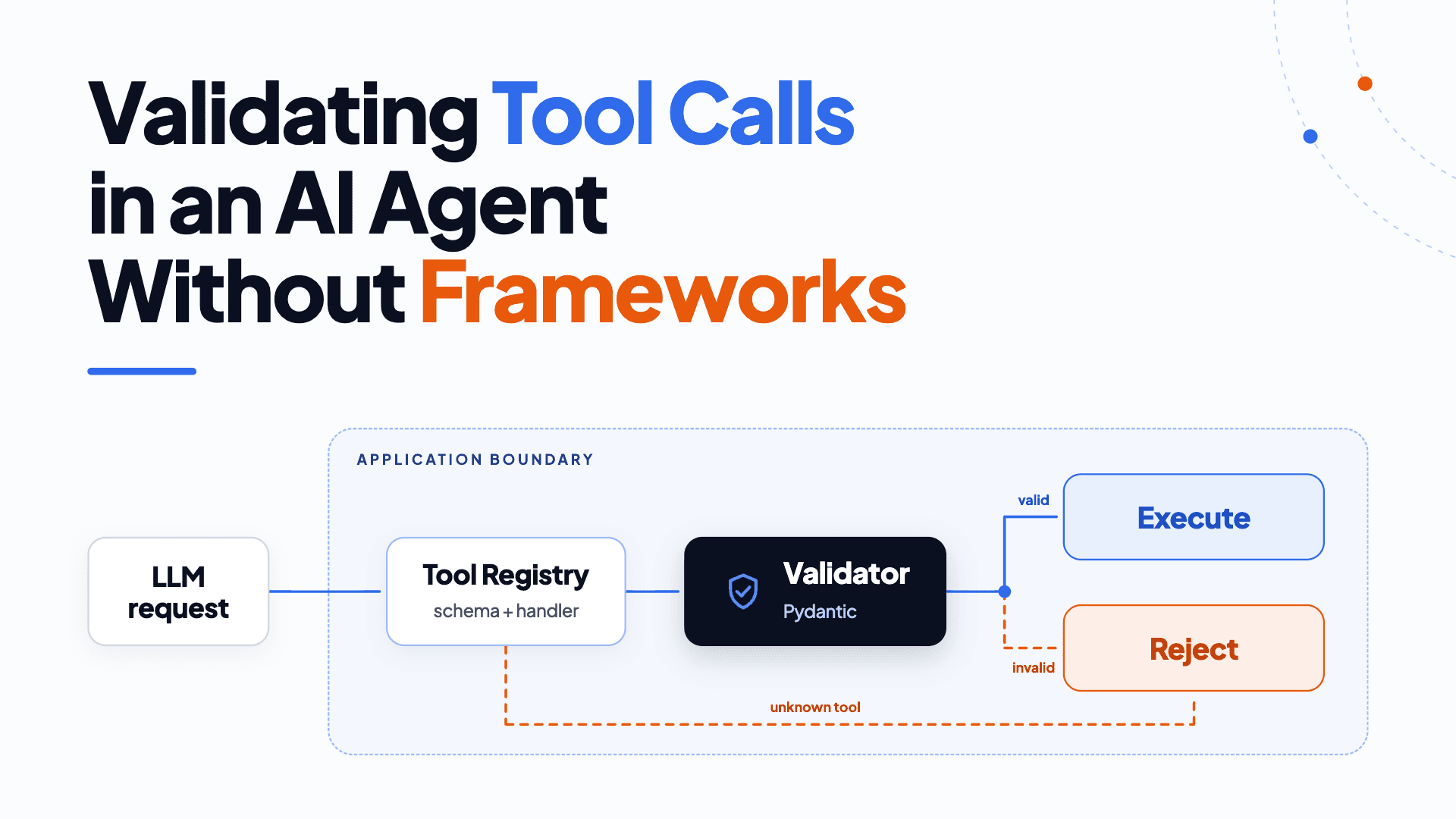
Extend an LLM-driven Python agent with an explicit tool registry, typed argument validation using Pydantic, and application-controlled tool execution. Compare direct and validated execution through reproducible experiments.
From Decision to Tool Calls
In the previous article, we extended our deterministic API latency investigation agent with an LLM that can propose its next action. The application remained responsible for validating the decisions, executing operations, updating state, and controlling termination.
However, our actions had no explicit input arguments. Consider an agent investigating increased latency across multiple services. Selecting observe_latency is no longer sufficient. The application also needs to know which service to inspect and the time window to use.
{
    "name": "observe_latency",
    "arguments": {
        "service": "orders-api",
        "window_minutes": 15
    }
}
Build a Tool Registry
A tool registry is an application-owned collection of available tools and their associated definitions. Instead of dynamically resolving arbitrary Python functions from model-generated names, we explicitly register the functions that the agent can request.
Our investigation will continue using two simulated operations:
def observe_latency(**arguments):
    return {'p95_ms': 850, 'query': arguments}

def inspect_deployment(**arguments):
    return {'version': 'v2.4', 'query': arguments}
These functions intentionally accept arbitrary keyword arguments so that we can observe the behavior of an executor without input validation. First, we represent a proposed tool call using Pydantic.
from pydantic import BaseModel

class ToolCall(BaseModel):
    name: str
    arguments: dict
This model validates the general structure of a tool call, but it does not ensure its arguments meet a particular tool's requirements. For example, arguments can contain an empty dictionary even when the requested operation requires a service name. Each registered tool therefore needs its own argument contract.

Validating Tool Arguments
Input validation involves more than checking whether incoming data can be parsed. OWASP distinguishes syntactic validation, which concerns the structure of input, from semantic validation, which concerns its validity within a particular context.
{"window_minutes": -15}The value is a valid JSON integer. However, it does not represent a meaningful observation window in our application. We can express both structural requirements and domain constraints using Pydantic.
from typing import Literal
from pydantic import BaseModel, ConfigDict, Field

class DeploymentArgs(BaseModel):
    model_config = ConfigDict(strict=True, extra='forbid')
    services: Literal['orders-api', 'payments-api']

class LatencyArgs(DeploymentArgs):
    window_minutes: int = Field(ge=1, le=60)
These contracts establish several constraints: the service must belong to a known collection of service names; the observation window must be an integer between 1 and 60 minutes; unexpected arguments are rejected.
The time interval and service name are application-specific decisions for this experiment. Pydantic normally performs certain type conversions during validation. Enabling strict mode prevents a string such as “15” from being silently converted into an integer for our argument model.
registry = {
    'observe_latency': (LatencyArgs, observe_latency),
    'inpsect_deployment': (DeploymentArgs, inspect_deployment),
}
The tool registry now contains both the execution target and the contract required to reach it
Executing and Testing Tool Calls
Let's compare two execution strategies using the same registry and simulated operations.
Direct Execuion. The first executor resolves the requested tool and passes its arguments directly to the handler.
def direct_execute(call):
    entry = registry.get(call.name)
    if entry is None:
        return 'unknown_tool', None
    return 'executed', entrty[1](**call.arguments)
The registry prevents unknown tool names from reaching an arbitrary function. However, registered functions receive arguments without explicit validation. Because our simulated handlers accept arbitrary keyword arguments, they also accept values that violate the intended contracts.
Validated Execution. The second executor validates the arguments using the schema associated with the requested tool.
from pydantic import ValidationError

def validated_execute(call):
    entry = registry.get(call.name)
    if entry is None:
        return 'unknown_tool', None
    schema, handler = entry
    try:
        args = schema.model_validate(call.arguments)
    except ValidationError:
        return 'invalid_arguments', None
    return 'executed, handler(**args.model_dump())
The handler is invoked only after successful tool resolution and argument validation.

Experiment and Integration
Our hypothesis is that explicit argument validation prevents invalid arguments from reaching the registered handlers. Both executors receive nine predefined tool calls containing identical inputs. We use deterministic inputs rather than live LLM responses because the experiment evaluates execution behavior, not the model's ability to generate correct calls.
call = ToolCall(
    name='observe_latency',
    arguments=("service": "orders-api", "window_minutes": -5)
)
assert direct_execute(call)[0] == "executed"
assert validated_execute(call)[0] == "invalid_arguments"| Scenario | Direct | Validated |
|---|---|---|
| Valid latency query | Executed | Executed |
| Valid deployment query | Executed | Executed |
| Unknown tool | Rejected | Rejected |
| Missing argument | Executed | Rejected |
| Incorrect type | Executed | Rejected |
| Negative time window | Executed | Rejected |
| Excessive time window | Executed | Rejected |
| Unknown service | Executed | Rejected |
| Unexpected argument | Executed | Rejected |
The direct executor dispatched eight calls, including six with invalid arguments. The validated executor dispatched only the two valid calls. Both rejected the unknown tool because they shared the same registry. These are the results reported in the original draft, written in Python and Pydantic.
Connecting the executor to the agent. The execution controller remains responsible for the investigation lifecycle.
status, result = validated_execute(call)When execution succeeds, the controller can record the returned observation in its state. When validation fails, the controller must decide how to handle the rejection without bypassing validation or ignoring the execution limits. The executor does not own the agent's lifecycle.
Limitations and Next Steps
We have introduced an explicit tool registry, individual argument contracts, and a validation mechanism that runs before tool execution. However, several limitations remain.
First, our tools return simulated observations. Real monitoring integrations may introduce network failures, timeouts, unavailable resources, and additional validation requirements.
Second, the experiment uses intentionally permissive handlers. Other Python implementations might reject malformed arguments through function signatures or internal checks, producing different results.
Third, we tested predefined calls rather than native tool requests generated through an LLM API. The validation mechanism can be reused when processing those requests, but the provider integration requires additional work.
Finally, a valid argument contract does not establish whether the current user is authorized to perform the requested operation. For example, payments-api is a recognized service in our schema. That does not establish that every user should be allowed to inspect it.
Argument validation and authorization address different engineering concerns. In the next part, we will examine how authorization policies can restrict otherwise valid tool calls before they reach external systems.
References & Further Reading
Integrating an LLM into an Agent Without Frameworks
OpenAI — Function Calling
Pydantic — Strict Mode
OWASP — Input Validation Cheat Sheet
Related articles
Agentic Systems
Integrating an LLM into an Agent Without Frameworks
Agentic Systems
Building an Agent Without Frameworks
Agentic Systems
Dynamic Decisions Create New Engineering Responsibilities